Checking out is an easy 3 step process
- Fill in your order information
- Review the order
- Submit your order and receive confirmation
Related Links
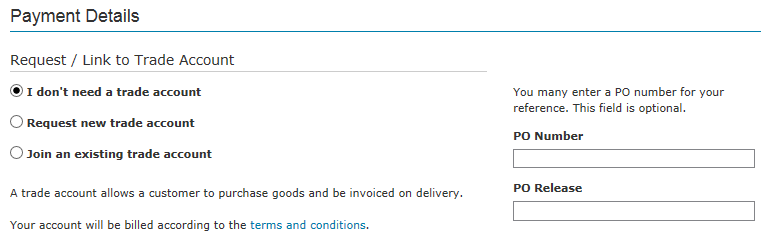
Order Information Page
Request / Link to element14 Account
- First time new customers may select “I don’t need a trade account” or “Request new trade account”.
- For returning online customers your account number should be listed here and preselected
- For existing customers, if you do not see your account number or this is your first purchase online, please choose “Join an existing trade account” or if you want a new account created, you may choose “Request new trade account”
- Email customer service: my-sales@element14.com Call customer service: 1800 88 6223 (toll free), 9:00am - 6:00pm, Monday - Friday
See more details under the Invoicing & Payment Help ▶
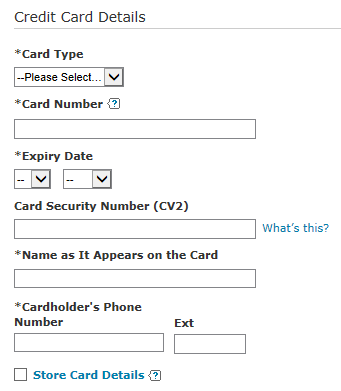
Credit/Debit Card Detail
If you select Credit Card as your invoicing method, you will see the fields for entering your card number and related information. If you have purchased with a credit card previously and allowed us to store the card details, you will see the Stored Card menu and can select your previously used card. You will still be required to enter the CV2 security code as we do not store that for security purposes.
See Update Payment Cards help for information on storing and managing multiple credit/debit cards.
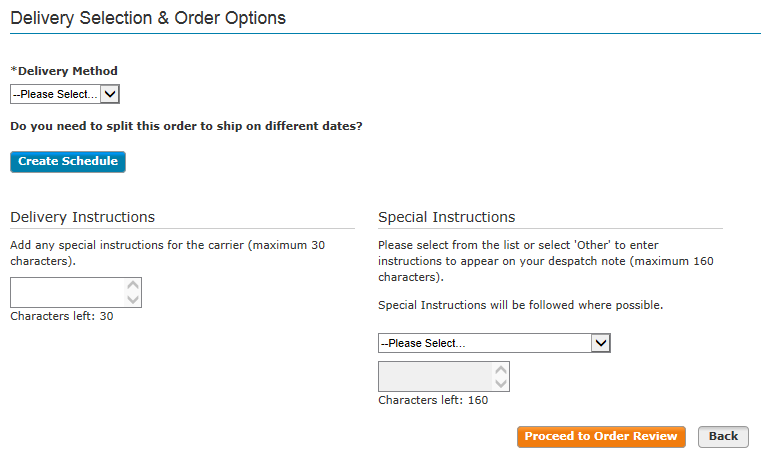
Delivery Selection & Order Options
Please choose your preferred method of delivery and add any notes or instructions. See Delivery Information help for information on various delivery options and limitations. See also Scheduled Order help for information on having an order delivered on multiple dates.
Setting Order Preference Defaults for Faster Checkout
For customers who return to purchase frequently, you can set up and designate the default account, invoicing method, addresses, and delivery method to be used for your future purchases in My Account. See Update Order Preferences help for more details
Placing Orders
When high demand for a product results in it being out of stock, we will provide an estimate of how long it will be before we expect additional inventory from the manufacturer to be available for delivery to customers.
Occasionally, demand for certain electronic parts is so great that industry-wide shortages emerge and we are temporarily unable to keep them in inventory. In that situation, we will advise you of expected waiting time for delivery and offer substitute or similar items as an alternative.
If you want to save your basket online for purchase later you can use the Saved Baskets feature.
Certain products like resistors or cable come in reels or packs of set length or quantity. They are not available for sale in quantities below certain levels because it is not economical to package them in smaller quantities.
You can enter a voucher code on the shopping basket page. When you have entered a valid voucher code, press the “Apply” button and the shopping basket total should display the updated discounted total. Related Links
You cannot directly check out from the saved basket page. You must add items from a saved basket to your current basket for check out. For more details visit the Saved Baskets page. Related Links
Yes. In the shopping basket, you can save your basket by entering the name of your choice in the Save basket field, then click “Save basket”.
Quotes, Delivery & General Info
- Try our live support 9:00am - 6:00pm, Monday - Friday
- Email customer service: my-sales@element14.com
- Call customer service: 1800 88 6223 (toll free), 9:00am - 6:00pm, Monday - Friday
A Freight Forwarder exports your delivery for you. If you are delivering to a freight forward service, we are required to ask for the address of the ultimate destination.
See the Scheduled Orders section for more information.
Special instructions and Delivery notes let you attach information to your order. They will appear on all correspondence regarding your order. As you checkout, the delivery page has a field named “Delivery Notes”, enter your notes into this field to take advantage of this feature.
Order notes let you attach information to your order for use by you and your company. They will appear on all correspondence regarding your order. As you checkout, the order information page has a field named "Order Notes", enter your notes into this field to take advantage of this feature.
See the Quotes section for more information.
Yes. In the shopping basket, use the Line Notes field to enter information to help you or your staff. Line notes will appear on all the order packing slips. Keep in mind that line notes are only for use by you and your company internally.
At this moment, we don't offer Saturday delivery, you can refer to Delivery Information section for more information.
Orders & Account/Payment
We'll store your saved baskets indefinitely as long as they've been accessed in the past 12 months. Baskets that have not been accessed in the past 12 months will be deleted automatically.
Your order will be despatched from the warehouse the same day when you order on or before 12pm. Order after the cut-off time will be processed next day.
Expected delivery lead time is the next working day if the inventory is within the Asia Pacific warehouse. Items being transferred from other global warehouses may require additional time for delivery.
(Please note: Orders on credit review may take longer to process.)
For backorder preferences, you may choose from the following: Backorder allowed - We'll deliver in-stock items immediately and place any out-of-stock items on backorder. Items on backorder will be delivered as they become available. Therefore, your order may arrive in single or multiple deliveries. Deliver order complete - If any items in your order are out of stock, we'll hold your order until all items become available. Your order will arrive in one delivery.
See the Trade Account section for more information.
Yes. If you are over your account "credit limit" credit hold, you can still place orders using a credit card. If you are on "stop order" credit hold, you must contact an element14 service representative at +60 3 5635 0686
The following characters can be used when filling in forms:
- a-z, A-Z, 0-9
- All punctuations and most special characters except ‘|’ & ‘\’ (Note: fields such as post codes, phone numbers etc. will not accept special characters)
- Bullet point for multi-byte characters
On the Registration page, enter your Customer ID and element14 Account Number to place your order on account. If you have already registered without your ID and Account Number, contact a service representative for assistance by calling +60 3 5635 0686.
The prices you find on the element14 website do reflect when products are on sale or promotion.
There are a few products, however, that we cannot discount because of franchise agreements with the manufacturer. The promotional price will not be applied to those products. You'll only see the standard price.
Discounts cannot be stacked. If you are receiving a promotional discount you will not get other discounts such as corporate service agreement or website specific discounts. Different discounts take precedence depending on your company's agreement with element14.
Order Management
Product Information & Support
How can we help you?
Customer Service: 1800 88 6223 (toll free)
Product Technical Support: +60 3 5637 3555 9:00am - 6:00pm, Monday - Friday